
OxygenEvent · General meetings
The online general meeting,
with live voting
For associations and federations: your members vote online, in the room, by proxy or by postal vote. The quorum is followed live, resolutions are counted in votes and the draft minutes are ready at the end of the meeting.
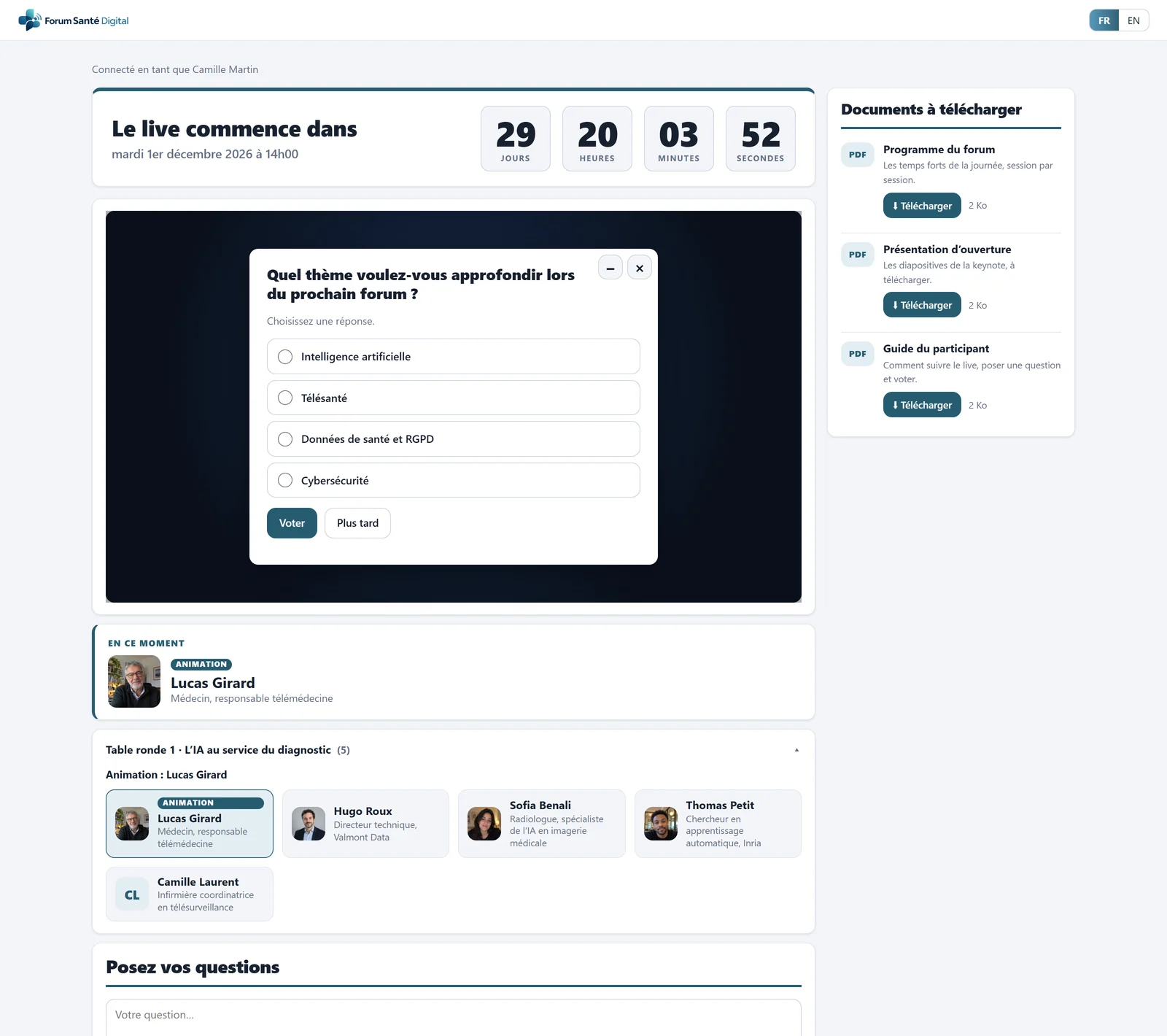
- Countdown before the live
- Your video player, embedded
- Poll question over the video
- Downloadable documents, tracked
- The speaker on stage, with a photo
- Speakers of the current chapter
Legal framework
What a remote meeting requires, what OxygenEvent does
For each usual requirement of a remote meeting, the matching tool or record.
Identify each participant
Your members by invitation, or by registration that you approve. In the room, each member identifies with their e-mail address, and counts only once, in the room or remotely.
Broadcast the deliberations continuously and simultaneously
The meeting is streamed live on the live page, in your video player. OxygenStream can film, produce and stream the meeting.
Establish the quorum
Live quorum, in votes or in members: remote, in the room, by proxy and by postal vote. A time-stamped quorum snapshot each time a vote opens.
Let members vote
For / Against / Abstain resolutions, voted online, in the room from a phone, by proxy or by postal vote before the meeting, each member with the number of votes assigned to them.
Calculate the result
Automatic majority calculation (simple, absolute or two-thirds) according to the rule you choose. Resolution carried or rejected, shown when the vote closes.
Keep the attendance sheet
Exportable attendance sheet (Excel), with members in the room or remote, represented members and postal votes.
Draft the minutes
Draft minutes as a PDF, archived with its digital fingerprint (SHA-256), to review and sign according to your rules.
Keep track of corrections
Resets, deletions and amendments are recorded in a log, included in the draft minutes.
Protect participants' data
Consent on entry, data subject rights and purge of old data, in line with the GDPR.
For an association, the terms of a remote meeting are first set by its articles of association and by-laws. Example of a French text for companies: Commercial Code, article R225-97 (identification, at least the participants' voices, continuous and simultaneous broadcast of the deliberations), checked on Légifrance on 1 November 2026. This reminder is not legal advice.
Before the meeting
Your members, their votes and their proxies
A dedicated General meeting mode: you know who votes, with how many votes, and on whose behalf.
- A General meeting mode: your members by invitation, or by registration that you approve.
- Approving registrations: approve or decline registrations, one by one or in a batch. Only approved members vote and count towards the quorum, the others follow the meeting.
- Votes per member: one vote by default, adjustable member by member or by pasting a list. Votes are fixed at the moment of voting.
- Proxies: you enter them one by one or by pasting, with an adjustable cap (3 proxies per holder by default). The proxy holder votes for the members they represent, who count towards the quorum and in the results. If the absent member turns up, they take back their vote.
- Meeting documents: report, agenda and resolutions as PDF or presentation, with download tracking.
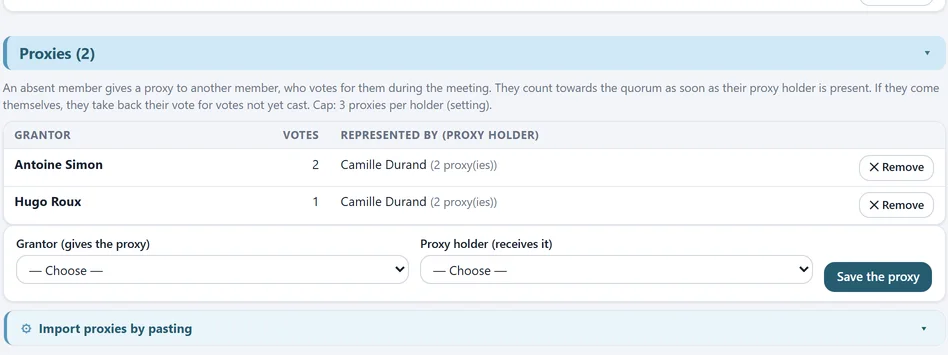
- Absent member and votes
- Proxy holder and proxies
- Entered one by one
- Or by pasting
Proxies: member represented, votes and proxy holder, with the proxy cap.
Before the meeting
Postal voting
Members who won't attend vote in advance, from the live page.
- Open before the meeting: until a deadline you set (by default, the start of the event), on the resolutions that allow it.
- Can be changed: the member can change their choices until the deadline.
- Counted everywhere: a postal voter counts towards the quorum, and their votes are added to the meeting's results.
- If a resolution is amended: an adjustable rule for postal votes (not counted, counted Against or counted Abstain), recorded in the log and in the draft minutes.
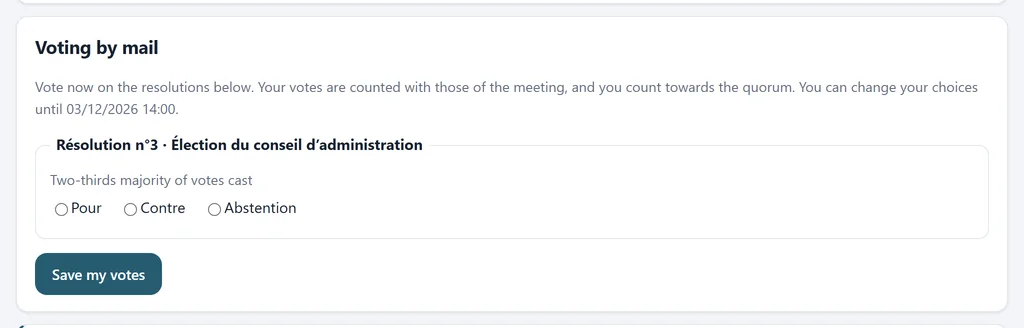
- Can be changed until the deadline
- Majority rule
- For, Against, Abstain

- Deadline
- Postal voters
The member votes from the live page, the organiser follows voters and their votes.
During the meeting
A hybrid meeting, online and in the room
Remote members vote over the video, those in the room from their phone. All count towards the same quorum.
- Remotely: the resolution appears over the video, each member votes once with their votes.
- In the room: the projected QR code opens an identification by e-mail address, with no video player. The member votes from their phone and counts towards the quorum until they leave the room.
- A member counts only once: in the room or remotely. You see the list of members identified in the room and can remove one.
- The rest of the audience: non-members continue without identifying: they ask questions, answer the quiz and the survey, without voting.
- You stay in control: send the resolution when you want, close it manually, follow results in real time.
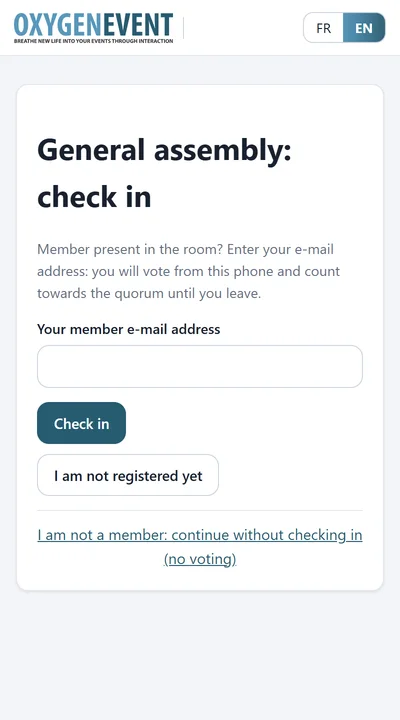
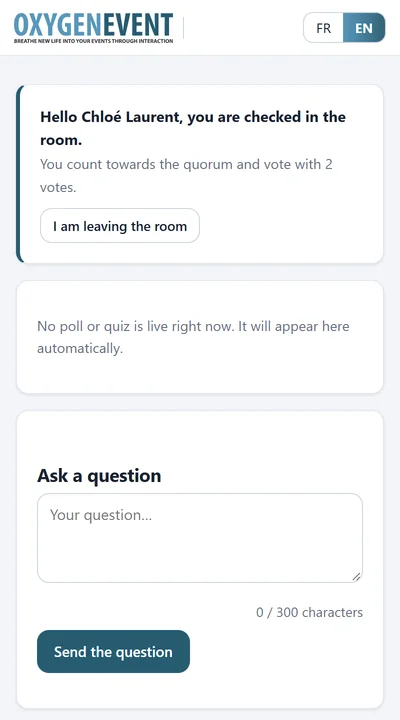
In the room: the member identifies with their e-mail, then votes from their phone.
Resolutions
Resolutions counted in votes
Each resolution is voted For / Against / Abstain, and the platform calculates the result according to the majority rule you choose.
- “Resolution” type: For / Against / Abstain, counted in votes, with the number of people.
- Automatic majority calculation: simple, absolute or two-thirds, on the votes cast, the members present or all members.
- Carried or rejected: the result appears in the administration area with the details of the calculation, and on the control-room screen when the vote closes, never during it.
- Amendment during the meeting: the “Amend” button changes the text and applies your rule to postal votes.
- Log: resets, deletions and amendments are recorded in a log, included in the draft minutes.
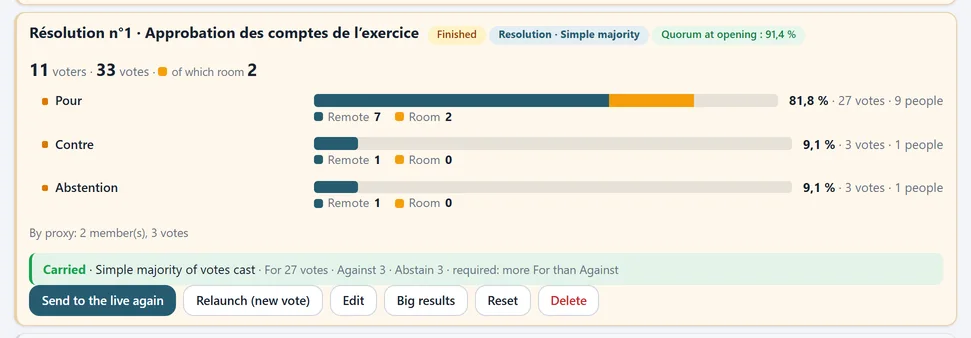
- Voters and votes
- Remote and in the room
- Share, votes, people
- Carried: majority calculated
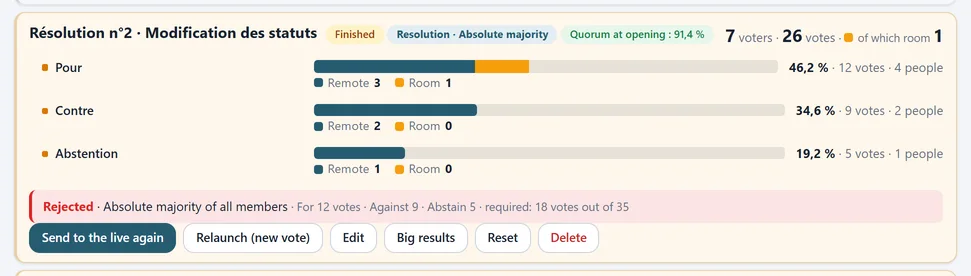
- Rejected: calculation details
Two closed resolutions: one carried by simple majority, the other rejected for lack of an absolute majority.
Quorum
Follow the quorum live
The quorum counts each member once, however they take part, and keeps a record at every vote.
- Live quorum: in votes or in members, remote, in the room, by proxy and by postal vote, with a threshold as a percentage or a fixed value.
- A gauge wherever it is needed: in the module, in the control room, on the host page and on the results page.
- Quorum snapshot: a time-stamped quorum snapshot each time a vote opens, included in the export.
- Pending registrations: a reminder shows the registrations to approve: until approved, they don't vote and don't count towards the quorum.
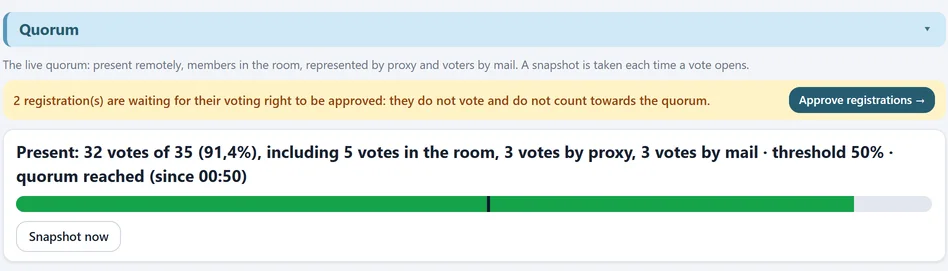
- Pending registrations
- Quorum breakdown
- Gauge and threshold

- Time of the snapshot
- Quorum at that moment
The live quorum and its time-stamped snapshots, each time a vote opens.
Speakers
Introduce the chair and the speakers
Members see who is speaking, for example the chair, a rapporteur or a guest, with their photo and role.
- Speaker gallery: first name, last name, role and photo (or initials) for each speaker.
- On stage in one click: the speaker appears straight away on the live page, under the player or as a banner over the video.
- A meeting in several parts: one chapter per segment (chair and reports, presentation of the resolutions, questions…). You move from one to the next in one click and the audience only sees the speakers of the current chapter.
- From the host's tablet: change speaker without going through the administration area.
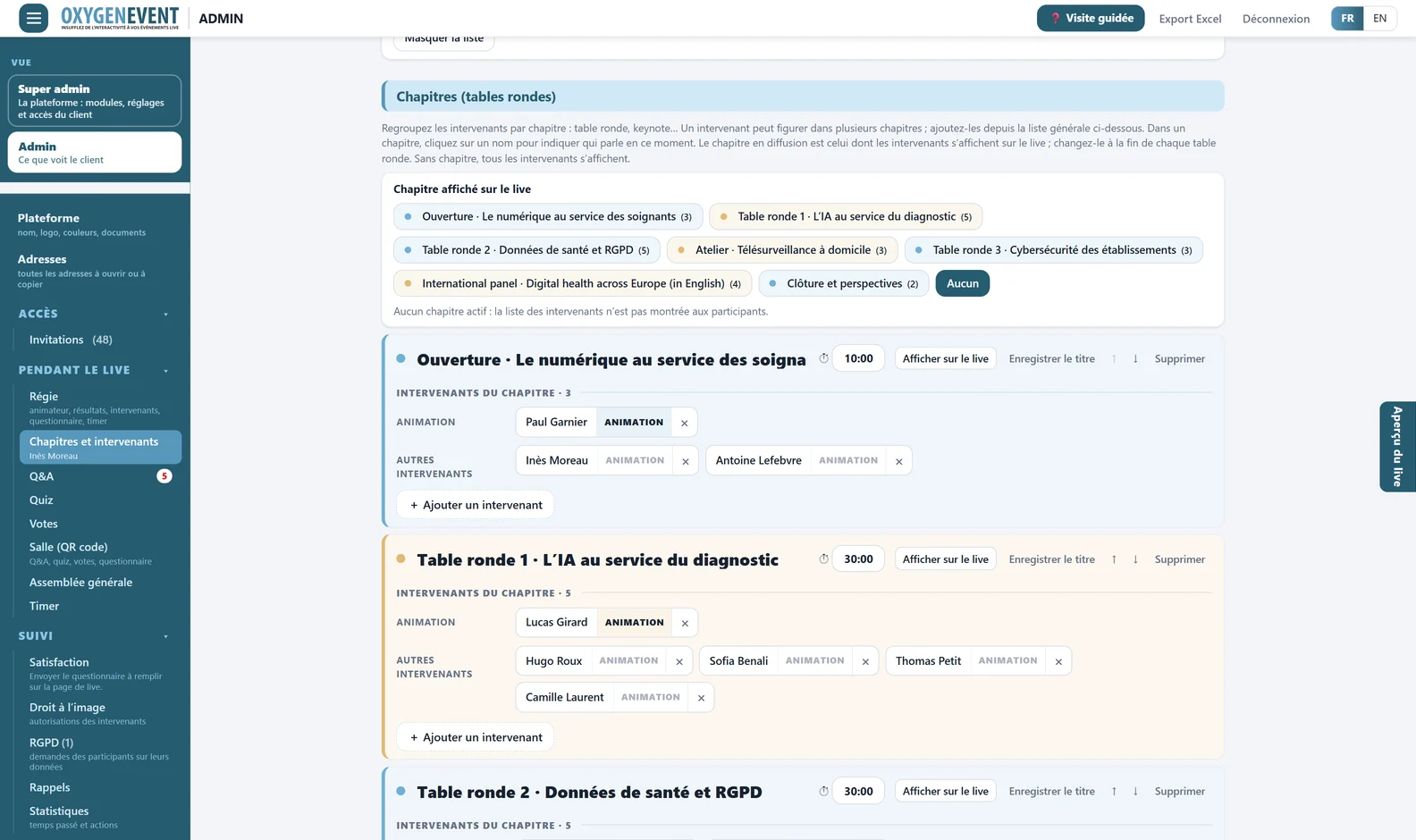
- Keynote, round tables…
- One click to switch chapter
- Chapter duration, used by the Timer
- Host flagged
- Other speakers
The administration area: chapters, the chapter being broadcast and their speakers.
After the meeting
Draft minutes, ready to review
The minutes are prepared from the meeting data, and each version is archived.
- Draft minutes: printable page and PDF generated by the server: attendance (in the room, remote, represented, postal), quorum, agenda, each resolution with its votes, majority and result, two signature boxes and an appendix listing those present.
- Archived with its fingerprint: each PDF is archived with its date and digital fingerprint (SHA-256), which lets you check that a copy is identical to the archived document.
- Attendance sheet: CSV and Excel export: member, votes, arrival, time spent, in the room or remote, represented by, postal vote, and participation in each vote.
- Built-in GDPR tools: consent on entry, attendees' rights and purging of old data.
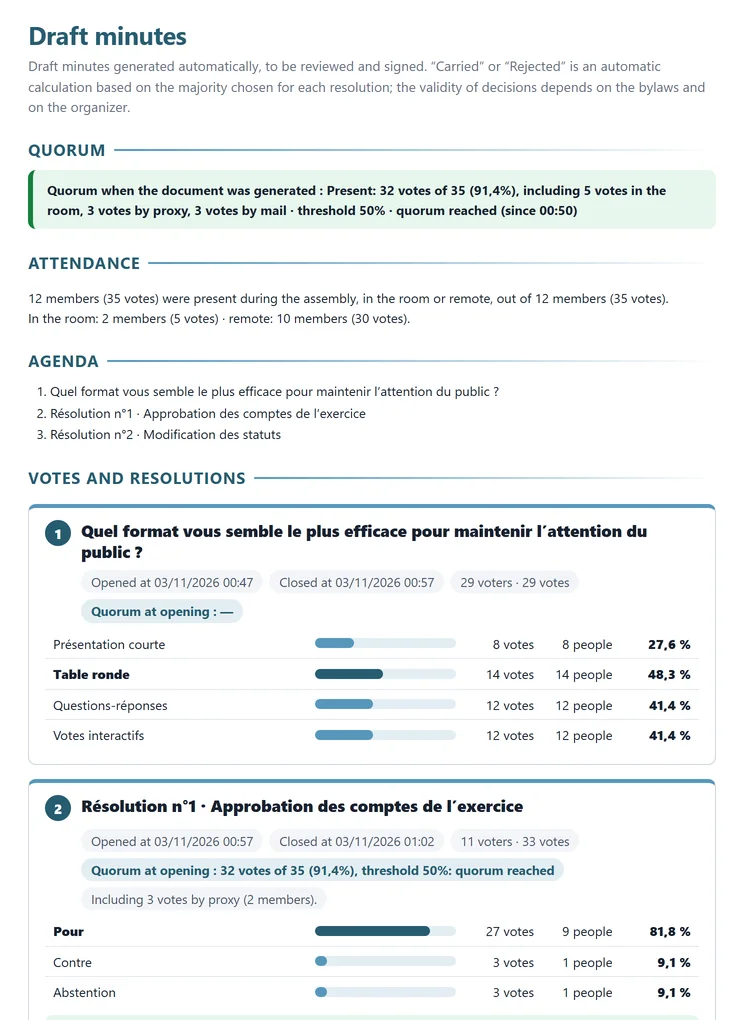
- Quorum when issued
- Attendance: room and remote
- Agenda
- Quorum at each vote
- Results in votes
The draft minutes, generated from the meeting, to review and sign.
In full transparency
What the platform does not do
So that you can choose with full knowledge, here is what OxygenEvent does not offer today for a general meeting.
Secret ballot: voting is by name, the organiser sees who voted for what.
Stronger identification: in the room, members identify with their e-mail address. There is no one-time code. Safeguards: one connection per member, and the list of members in the room with a button to remove one.
Proxies filed by members: the organiser enters the proxies. Members do not file their proxy online.
Electronic signature: the minutes are a draft, to be reviewed and signed by hand.
Voting colleges: there are no results per college and no votes per category of members.
Co-ownership: co-ownership (condominium) meetings, with their shares and specific majorities, are not covered.
The validity rules (notice, articles of association, majorities, proxies) remain your responsibility: the platform calculates, it does not check compliance. Tell us about your meeting during the demonstration: we will tell you frankly whether the platform fits your case.
Going further
One platform for all your live events
The same modules, switched on as you need them, serve every format: webinars, general meetings, live Q&A and live polls.
Frequently asked questions
General meetings: your questions
Is an online general meeting valid?
Yes, if it follows the rules that apply to your organisation: for an association, first its articles of association and by-laws. Usually: identified participants, deliberations broadcast continuously and simultaneously, quorum and result of each vote established. OxygenEvent provides the tools and the records: identified members, captured quorum, attendance sheet, resolutions counted in votes, draft minutes. Have your setup validated by your legal adviser.
Can we hold a hybrid meeting, online and in the room?
Yes. Remote members vote on the live page, those in the room identify with their e-mail address through the projected QR code and vote from their phone. All count towards the same quorum, each only once.
Are proxies possible?
Yes. You enter the proxies (absent member and proxy holder), one by one or by pasting, with an adjustable cap. The proxy holder votes for each member they represent, who count towards the quorum and in the results. If the absent member turns up, they take back their vote.
Can members vote by post?
Yes, on the resolutions you open to it, before the meeting and until a deadline. The member votes from the live page and can change their choices until then. They count towards the quorum and their votes are added to the results.
Does the platform calculate the majority?
Yes. For each resolution, you choose the rule: simple, absolute or two-thirds majority, on the votes cast, the members present or all members. The platform calculates the result in votes and shows the resolution as carried or rejected when the vote closes. The organiser chooses the rule: the platform calculates, it does not check your articles of association.
Can a member have several votes?
Yes. Each member has one vote by default, and you can assign more, member by member or by pasting a list. Votes and quorum are then counted in votes, and results also show the number of people.
What is in the draft minutes?
Attendance (in the room, remote, represented, postal), quorum, agenda, each resolution with its votes, majority and result, two signature boxes and an appendix listing those present. It is generated as a PDF and archived with its date and digital fingerprint (SHA-256). It is a draft: it is reviewed and signed by hand.
How do we approve members' registrations?
In General meeting mode with a registration form, each registrant follows the meeting straight away, but only votes and counts towards the quorum once you approve them. You approve or decline line by line or in a batch.
Can we try a general meeting?
Yes. The demonstration offers a ready-made general meeting example (members, proxies, postal vote, resolutions, draft minutes), and the guided tour has a part dedicated to general meetings.
Can we use our usual streaming tool?
Yes. The live page embeds the player from your streaming platform as long as it provides a secure embed address. OxygenStream can also handle filming, production and streaming for the meeting.
Give your next general meeting room to breathe
A demonstration lets you see OxygenEvent at work on your meeting: number of members, proxies, postal voting, resolutions and majority rules.